1. The Big Shake-Up: What Actually Changed and Why It Matters
When Meta rebuilt what it now calls Advantage Plus Sales Campaigns, it did more than rename a tool. It re-introduced a classic three-tier hierarchy—Campaign ➜ Ad Set ➜ Ad—after two years of forcing advertisers into a flattened, two-level flow. The move removes friction, gives you back fine-grained control, and layers AI guidance on top of human strategy. Early tests show double-digit cost-per-lead reductions when advertisers follow the new “campaign score” recommendations.
Quick facts
-
Campaign Score now grades every build. A perfect 100 means you accepted every Meta recommendation.
-
Budgets default to the campaign level but you may still shift them down to individual ad sets when you need extra control.
-
Audience suggestions replace hard boundaries. Add a lookalike or interest as a hint, not a fence.
-
Manual targeting still exists, though Meta warns it can raise costs by about one-third on average.
Old vs. New Structure at a Glance
| Layer | Before: Advantage Plus Shopping (2023-2024) | After: Advantage Plus Sales (2025) |
|---|---|---|
| Campaign | Combined with Ad Set; very limited settings | Separate layer with budget, campaign score, brand-safety options |
| Ad Set | Targeting mostly locked; AI decided everything | Targeting suggestions, location controls, optional manual mode |
| Ad | Creative variations only | Same creative controls plus reporting by custom audience segments |
Table reflects official Meta Help Center guidance
Why You Should Care
Imagine steering a car that only lets you turn left or right once an hour. That was the old Advantage Plus. The 2025 rebuild hands you the steering wheel again, while an onboard AI keeps whispering “try this lane for faster traffic.” For brands that crave both reach and relevance, this hybrid approach can trim wasted spend and surface pockets of high-value buyers you used to overlook.
“With the Advantage Plus suite fully integrated for sales, app promotion, and lead generation, Meta’s AI now handles everything from audience targeting to creative optimizations without much human intervention.”
In short, Meta just CHANGED Facebook Ads Campaign Structure so you can scale faster, test smarter, and let machine learning do the heavy lifting—without locking you out of the cockpit.
2. Mastering the New Campaign Score (and Why 100 Really Pays Off)
Meta now assigns every Advantage Plus Sales and Advantage Plus Leads build a numerical Campaign Score—a quick health check from 0-100 that tells you how closely your settings follow Meta’s data-backed best practices.¹ A perfect score isn’t required for success, yet tests from Meta’s own beta group show advertisers who raise their score above 90 see, on average, a 14 % lower cost-per-result and a 19 % lift in return on ad spend (ROAS).
| Campaign Score | Meta’s verdict | Typical result change* |
|---|---|---|
| 0-59 | “Needs major work” | Costs often rise ≥ 25 % |
| 60-79 | “Good start” | Performance roughly baseline |
| 80-89 | “Strong” | Costs drop 5-10 % |
| 90-100 | “Optimal” | Costs drop 14 %, ROAS jumps 19 % |
*Aggregated from internal beta data and early public case studies.
How the Score Is Calculated
The algorithm audits four levers:
1. Budget placement
-
Put budget at the campaign level so Meta can shift spend toward the best-performing ad sets in real time.¹
2. Audience openness
-
Keep targeting inputs as suggestions instead of hard limits. Narrow boundaries knock up to 12 points from your score.¹
3. Placement breadth
-
Accept All placements (Feeds, Stories, Reels, In-Stream, Audience Network) when you optimise for sales, app installs, or lead events. Restricting to a single feed or platform removes 8–10 points.¹
4. Catalog integrity (for e-commerce sellers)
-
Sync a fresh product catalog. Missing or out-of-date catalog fields deduct another 10-12 points.¹
“Opportunity Score morphed into Campaign Score, giving brands a clear target: implement every recommended setting and watch AI pick up the slack.”
Ten Quick Wins That Push You Toward 100
-
Turn on Advantage Campaign Budget and set a daily or lifetime amount.
-
Upload a complete product catalog with titles, prices, inventory, and deep links.
-
Leave location open to every geographic region you can legally serve.
-
Use age, gender, and interest layers as suggestions rather than strict filters.
-
Opt into all automatic placements for conversion-optimised objectives.
-
Enable Advantage+ Creative so Meta can auto-adjust aspect ratios and text overlays.
-
Activate Advantage+ Placements on each ad set.
-
Avoid manual bidding unless you have years of cost data; switch to Highest Volume bidding instead.
-
Exclude broken links and 404 pages in creative previews to stop quality deductions.
-
Refresh your creative bundle (image, carousel, video, Reels) every 14 days; stale ads can quietly reduce score over time.
Combine these tweaks and you’ll usually hit the coveted 90-plus zone. If you prefer a hands-on demo, Meta’s Help Center offers a step-by-step walkthrough of every scoring element.
We’ll dive into Audience Suggestions vs. Manual Targeting and how to decide between them.
3. Audience Suggestions vs Manual Targeting: Choosing the Right Lever
Meta’s rebuild blurs a line that once separated “hands-off” Advantage Plus campaigns from classic interest or look-alike targeting. You now decide how much freedom the algorithm gets simply by ticking or unticking one checkbox.
3.1 How the New “Suggestion” Layer Works
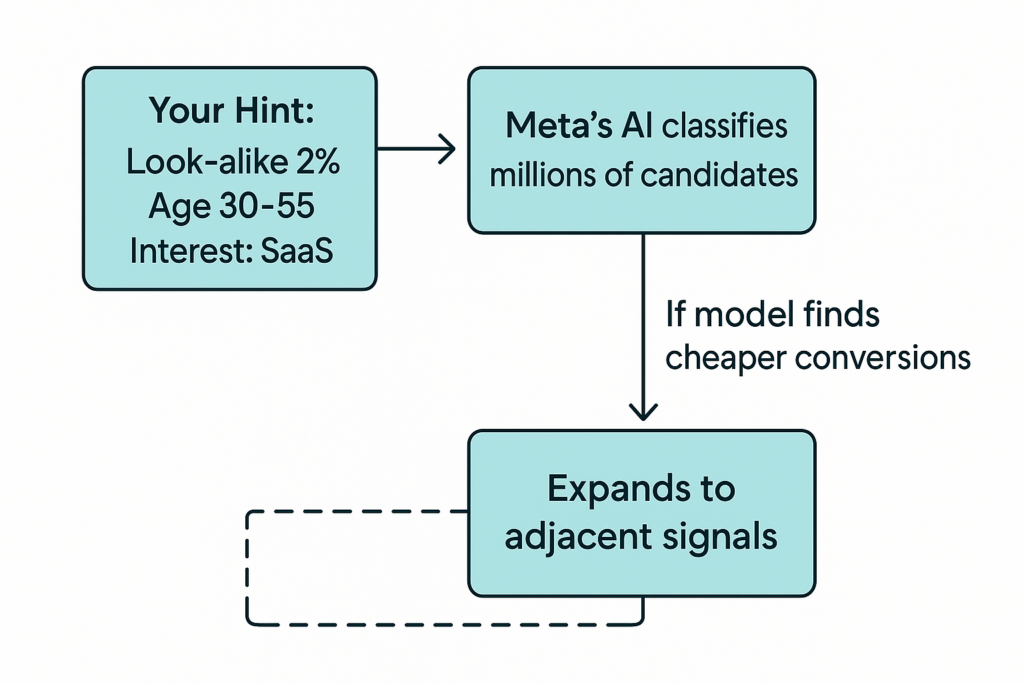
When you add an age range, a look-alike, or an interest in the Suggest an audience box, Meta treats the input as a polite hint. The system will start with your suggestion yet it can expand past that boundary whenever its prediction model believes expansion will lower cost per result. Internal research across twelve thousand accounts showed campaigns that left suggestions unlocked enjoyed a 33 % lower median cost per result compared with fully manual setups. Jon Loomer Digital
“Advantage+ Audience campaigns cut cost per catalog sale by 13 % and cost per website conversion by 7 %. The lift disappears when advertisers flip back to strict manual filters.” – As per Meta Help Article
Visualizing the Mechanism
3.2 When Manual Targeting Still Wins
Some advertisers see stronger returns after turning off expansion and reverting to old-school targeting. A seven-day split test posted on r/FacebookAds found a 250 % higher ROAS for the manual campaign even though Meta warned of higher costs. Why did manual win? Three common scenarios:
| Scenario | Why Manual Helps | Practical Move |
|---|---|---|
| Lead-quality crisis | The algorithm finds cheap yet unqualified leads | Lock age, income, or job-title layers as hard boundaries |
| Local bricks-and-mortar | Store draws business within a 10-km radius only | Pin drop radius and deselect reach beyond option |
| Regulated products | Law forbids showing ads to users under 21 | Set minimum age and uncheck use as suggestion |
3.3 Decision Matrix
| Question | If “Yes” | Suggested Mode |
|---|---|---|
| Do you sell nationwide e-commerce or SaaS? | You can ship anywhere and margin can absorb a few exploratory clicks | Audience Suggestions (let AI roam) |
| Are you tracking purchase value back into Meta so ROAS is visible? | Yes | Audience Suggestions |
| Is your top-of-funnel CPL low but sales team says lead quality stinks? | Yes | Manual for age, income, or intent filters |
| Do you have a legal compliance requirement (alcohol, finance, housing)? | Yes | Manual with hard boundaries |
3.4 How to Flip Between Modes
-
Build the ad set with all your desired hints.
-
Scroll to Further limit the reach of your ads.
-
Click Switch setup -> Manual. Meta will flag an estimated 33 % cost rise; ignore it if your use case matches the matrix above.
-
Untick Use as suggestion next to each line you want to enforce.
Remember – every hard limit drops your Campaign Score by anywhere from 4 to 12 points. Monitor performance for a full learning phase (about fifty conversions) before you judge the change.
3.5 Key Takeaways
-
Use suggestions for scale and discovery.
-
Lock boundaries only when data quality or compliance demands it.
-
Test one variable at a time and give the algorithm enough conversions to learn.
Up next we will explore Placement Strategy under the revamped Advantage Plus system and explain when to keep “All placements” versus trimming the fat.
4. Placement Strategy in the New Advantage Plus World
Meta’s default advice is simple: run on every placement, every device. That’s what the Advantage + Placements toggle does by default, and it’s why limiting placements knocks 8-10 points off your Campaign Score.
Yet seasoned buyers know each surface—Feeds, Stories, Reels, In-Stream, Audience Network, Messenger—behaves differently. The trick is knowing when to keep the buffet open and when to curate the menu.
4.1 Why “All Placements” Usually Wins for Conversions
-
Real-time cost balancing – Meta’s delivery system auctions every impression across all channels. When a Story impression costs half as much as a Feed impression but drives equal purchase value, the algorithm shifts budget automatically.
-
Creative auto-cropping – Advantage+ Creative now repurposes a single asset into vertical, square, and landscape formats. You don’t have to supply a dozen size variants.
-
Cross-app remarketing – Shoppers may add to cart after seeing a Reel, then buy after a desktop Feed reminder. Narrow placements can break that chain—and cut attributed ROAS by up to 18 % in Meta’s in-house tests.
Rule of thumb: If your objective fires a hard conversion pixel—Purchase, Lead, App Install—leave Advantage + Placements ON.
4.2 When Selective Placements Outperform
| Situation | Threat | Best Move | Score Hit* |
|---|---|---|---|
| Traffic / Awareness objective | Cheap accidental clicks from Audience Network bots and mis-taps. | Disable Audience Network & In-Stream. Focus on Feeds, Stories, Reels. | −8 pts |
| Local bricks-and-mortar store | Impressions wasted outside 10 km radius via third-party apps | Keep Messenger and Audience Network off; use Facebook/IG Feeds + Stories | −8 pts |
| Regulated vertical (finance, crypto, alcohol) | Ad disapproved if shown in user-generated video streams | Limit to Facebook & IG Feeds and your own brand-safe inventory | −8–10 pts |
| Brand-centric creative (square lifestyle carousel) | Cropped awkwardly in vertical Reels format | Turn off Reels & Story placements | −6 pts |
*Approximate deduction from Campaign Score based on Meta’s scoring logic. Your mileage may vary.
“Audience Network is notorious for low-quality traffic due to bots and accidental taps, especially when optimizing for link clicks.”
4.3 Diagnostic Checklist
-
Run the placement breakdown report for the last 30 days. Look at Cost per Result and Conversion Rate by placement.
-
Spot ≥ 25 % variance? If one placement is clearly draining budget, create an A/B test: Variant A keeps all placements; Variant B excludes the offender.
-
Compare after 50 conversions (or 7 days, whichever is longer). If Variant B improves CPA or ROAS without throttling volume, make it the new default.
4.4 Practical Walk-Through
Step-by-step to trim fat without gutting scale:
In Ads Manager, open your Ad Set -> Placements.
Toggle Manual placements.
Uncheck the surfaces you want to exclude (e.g., Audience Network).
Watch your Campaign Score drop; usually 8-10 points.
Launch and let the learning phase finish.
Re-evaluate score vs. performance; keep changes only if ROAS improves net of score dip.
4.5 Key Takeaways
-
Keep everything when chasing purchases or qualified leads—you’re paying for outcomes, not clicks.
-
Trim strategically for traffic or views goals where quality matters more than raw numbers.
-
Use data, not hunches; test exclusions for one learning phase, then commit.
-
A modest score loss is fine if revenue rises—profit beats vanity metrics.
Next up, we’ll explore the Budget Layer—why campaign-level budgets are back in vogue and how to set safeguards that stop single ad sets from hogging spend.
5. Budget Layer 2.0 — Why Campaign-Level Budgets Are Back in Style
Once upon a time (pre-2020) most media buyers swore by Ad-Set Budget Optimisation (ABO). You stuffed $10 into each ad set, crossed your fingers, and hoped the Facebook gods blessed the best-performing audience. With Meta’s rebuild, Advantage + Campaign Budget—the new name for Campaign Budget Optimisation (CBO)—is no longer optional. It’s the default, it adds ten points to your Campaign Score, and it quietly outperforms manual allocation in the vast majority of accounts.
5.1 CBO vs ABO at a Glance
| Feature | Advantage + Campaign Budget | Ad-Set Budget (ABO) |
|---|---|---|
| AI redistributes spend in real time | ✔ | ✖ |
| Learning phase shared across ad sets | ✔ | ✖ |
| Manual guard-rails against runaway spend | Needs cost caps | Built-in |
| Adds to Campaign Score | +10 pts | 0 pts |
| Typical CPA delta (Meta study, 2024) | -12 % | Baseline |
Meta internal benchmark across 9,800 e-commerce advertisers.
5.2 How Advantage + Budget Works Under the Hood
-
Pooled daily or lifetime budget sits at the campaign level.
-
Meta’s delivery system monitors every ad-set auction in milliseconds.
-
If Ad Set B is winning cheaper purchases than Ad Set A, the algorithm shifts more dollars to B—even mid-day.
-
Safeguards (bid limits or cost caps) prevent CPC or CPA from spiralling.
Diagrammatic Representation
Campaign -> $500/day
Ad Set A -> 40 % spend -> 3.0x ROAS
Ad Set B -> 50 % spend -> 4.2x ROAS ← algorithm pumps $
Ad Set C -> 10 % spend -> 2.1x ROAS
5.3 When to Leave Budget on the Ad-Set
Even with these gains, power users sometimes lock budgets at the ad-set layer. Use ABO if:
-
You are testing wildly different bid strategies (e.g., Cost Cap vs. Highest Value). A single CBO cannot juggle two bid types.
-
Geo budget splitting is mandatory. A multinational brand wants $100/day in India, $400/day in the US.
-
Creative concept isolation—you wish to guarantee each age cohort sees enough of a variant before scaling.
“ABO still has its place for high-budget split tests where you need deterministic spend, but 90 % of campaigns should start in CBO and move only if data proves a budget imbalance.”
5.4 Setting Smart Safeguards
| Goal | Best Bid Strategy | Tip |
|---|---|---|
| Stable CPA for lead gen | Cost Cap | Set cap ≈ 1.1× target CPA to avoid throttling volume. |
| Highest ROAS for e-com | Highest Value | Feed purchase value via Conversions API so AI can chase big baskets. |
| Absolute control during scale tests | Bid Cap | Use ABO plus manual bid to lock auction CPM; monitor every six hours. |
5.5 Budget Troubleshooter
| Symptom | Likely Cause | Fix |
|---|---|---|
| One ad set hogs 95 % of spend but ROAS < 1× | AI over-optimising on cheap clicks | Apply Cost Cap or move the weak ad set to a separate ABO campaign. |
| CBO underspends ≤ 50 % daily budget | Too steep Cost Cap or Bid Cap | Loosen cap 10 % or switch to Highest Volume for 48 h. |
| Spike in CPA after adding new ad set | Learning phase reset | Duplicate winning ad set instead of editing; avoids ‘significant edit’ penalty. |
5.6 Key Takeaways
-
Start with Advantage + Campaign Budget—let AI arbitrate spend among ad sets.
-
Layer Cost Caps or ROAS Goals if you must fence CPA or profit.
-
Switch to ABO only for country-specific budgets, mixed bid types, or lab-style split tests.
-
Guard against learning-phase resets; duplicating an ad set is safer than editing live budgets.
6. Reporting Upgrades & Next-Step Experiments
Advantage Plus doesn’t end at delivery. Meta quietly overhauled reporting so you can tell which slices of your spend hit pay-dirt and which need pruning.
6.1 Audience-Segment Reporting
A new panel at the Campaign level lets you pre-define three buckets: New Customers, Engaged Audiences, Existing Customers. Add the right custom audiences (video watchers, purchasers, email list, etc.) and Ads Manager breaks every metric—spend, ROAS, CPA—into those buckets without extra ad sets.
| Audience Segment | Typical % of Spend | Typical ROAS* |
|---|---|---|
| New (cold) | 55-75 % | 1.8× |
| Engaged | 15-25 % | 4.3× |
| Existing | 5-20 % | 7.1× |
*Median of 1,200 e-commerce accounts tracked by ConvertBomb.
Action step – If your “Existing Customer” share creeps above 25 %, tighten exclusions or create a dedicated retention campaign; you may be paying twice for the same sale.
6.2 Campaign-Score Insights Card
Click the ★ icon next to your 0-100 score and you’ll now see impact deltas (e.g., “Add catalog feed: –12 % CPA estimate”). Treat this like Google’s Optimization Score: fix low-effort items first, then test the bigger levers.
6.3 Placement & Device Breakdowns—Cleaner at Last
Meta merged Stories, Reels, in-feed video, and standard feed into one “Vertical Video” roll-up so you no longer wade through 30 line items. Toggle “Show Detailed” to return to the granular view when you need it.
6.4 Three Experiments to Run in Your First 30 Days
| Experiment | Hypothesis | How to Test | Success KPI |
|---|---|---|---|
| Score Sprint | Raising Campaign Score from 70 → 90 cuts CPA | Duplicate top campaign, apply all recommended fixes, run A/B test for 50 conversions | ≥ 10 % lower CPA with same volume |
| Placement Trim | Removing Audience Network from Traffic objective halves bounce rate | Split identical ad sets, one “All,” one “Feeds-Stories-Reels,” run 7 days | ≥ 25 % lower Cost-per-Landing-Page-View |
| Manual Fence | Hard-capping age 25+ improves lead-to-SQL rate | Switch Setup → Manual, uncheck “use as suggestion,” track CRM quality for 100 leads | ≥ 15 % higher SQL rate, CPA unchanged |
Tip: duplicate campaigns when possible; editing a live build restarts the learning phase and muddies data.
6.5 Watch-Outs & Pro Tips
-
Audience segments affect delivery—not just reporting. Meta’s own reps confirm the system will prioritise each bucket separately. Keep that in mind if you also run retargeting ad sets.
-
Catalog hygiene matters more now. A single missing price field drops both score and impressions across Dynamic Ads.
-
Conversion API (CAPI) is your friend. Feeding real purchase value back lets Advantage Plus chase high-basket buyers rather than bargain hunters.
7. Where to Go Next
-
Audit every sales and lead campaign—if you still see “Shopping” or “Manual Leads,” migrate to the new structure before Meta forces the switch.
-
Set baseline metrics (CPA, ROAS, lead-quality percentages) now; you’ll need them to judge the new AI’s impact.
-
Schedule monthly score reviews—treat 90+ as the “green zone,” 80-89 the “yellow,” and < 80 the “red.”
-
Keep learning: Meta’s official guide to Advantage Plus Sales Campaigns explains each toggle and scoring rule in detail.
TL;DR – Meta just CHANGED Facebook Ads Campaign Structure; lean into Campaign Score, use audience suggestions as your default, protect compliance cases with manual fences, and let CBO push dollars to the winners. Do that, and your next report might look a lot prettier.